Alice Vinogradova from Microsoft has delivered an impressive range of tools for ABAP developers. Vibing Steampunk (VSP) allows developers to build end-to-end RAP and OData solutions. I wanted to give it a test drive for an ABAP Cloud project I was working on.
This post provides the setup I used on my Mac and hopefully helps other developers on their RAP learning journey.
What wasn’t obvious (at least for me) was how to use VSP in a RAP / ABAP Cloud development context. VSP acts as a bridge between Claude Desktop and SAP’s ADT (ABAP Development Tools) REST APIs.
Installing VSP on macOS
The official instructions focus on Linux. For macOS, you need to build the Go binary locally. If you have Homebrew installed, this is simple.
Build the binary
# Install Go (if needed)
brew install go

# Clone and build
git clone https://github.com/oisee/vibing-steampunk.git
cd vibing-steampunk
make build
Note: This creates the executable under the /build directory.
Generate sample configuration files
Next, generate a sample configuration file that you can use as a template. In your terminal where you installed VSP, run these commands:
# Create sample config files
vsp config init

# Copy the sample env file
cp .env.example .env

# Edit it in Nano and save
nano .env
You will need to update the values for your SAP systems (connecting to ABAP Cloud is a little more complicated however).
Once you have configured a SAP system it is possible to run a command line to check if it’s working (in my scenario I connected to an ECC SAP system to test):
./build/vsp search "ZCL_*"If everything works, you should see results being returned from your SAP system.
Connecting to ABAP Cloud
Basic authentication is not an option for connecting to ABAP Cloud, so we need to use authenticated session cookies. This practically means:
- Authenticate to your ABAP system in your browser as normal
- Export the cookies that get set
- Configure VSP to replay those cookies on each HTTP request
Export cookies
A simple option is using a Chrome extension get cookies.txt (LOCAL) to export cookies in Netscape format.

After a successful login (to your ABAP launchpad), you should see the following cookies:
-
__VCAP_ID__(Cloud Foundry session) -
JSESSIONID(application session)
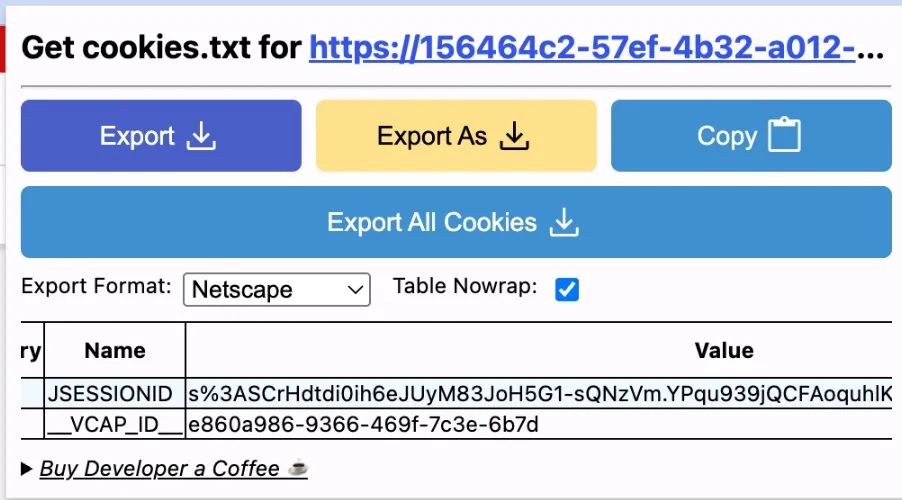
Now you can use the export button and save your cookies as a local text file (in Netscape format). In VSP there is an option to refer to this cookie file in configuration via the --cookie-file option:
{
  "preferences": {
    "coworkScheduledTasksEnabled": false,
    "sidebarMode": "chat"
  },
  "mcpServers": {
    "vsp-btp": {
      "command": "/Users/warrene/vibing-steampunk/build/vsp",
      "args": [
        "--url", "https://your-system.abap-web.us10.hana.ondemand.com",
        "--client", "100",
        "--cookie-file", "/Users/warrene/Downloads/cookies.txt",
        "--mode", "focused",
        "--enable-transports",
        "--allow-transportable-edits"
      ]
    }
  }
}
You will need this configuration file to connect Claude Desktop to VSP. On a Mac this is typically found at: ~/Library/Application Support/Claude/
Check connectivity
Now open Claude Desktop (or Claude Code) and check that you don’t see any errors being thrown. You should see the tool being called.
You can now start introspecting your ABAP Cloud system and start building and designing ABAP solutions.
What Are the Use Cases?
With this powerful tool, you can now start doing some amazing things.
Rapid Prototyping & UI Annotations
Quickly prototype solutions and get support for all those CDS annotations.
Code Explanations & Reviews
Ask Claude to review your RAP code for any issues before you start transporting them. If you load your naming conventions into a Claude skills file you can make sure you and the team are following best practices.
You can quickly get a summary of findings and prepare for a formal code review. Because the MCP server is mimicking an ADT client you can also run syntax and ATC checks.
Web Dynpro Conversions
We are busy converting ABAP WebDynpro projects in the Neptune Integration Hub ABAP classes to prepare clients for their S/4 upgrade journey. We analyse the WD components and then create clean REST interfaces and rebuild them as UI5 apps.
Generate Technical Specs
Easily create documentation based on your actual code to make your solutions easier to support. If you add sample files or update your Claude skills you will be able to build consistent deliverables.
Conclusion
With this setup, you can query your RAP system and start reviewing and building ABAP objects from Claude Desktop. In follow-up posts, I will show how to connect additional MCP servers and set up projects using Claude Code skills.