Why Context Matters More Than the Model
Every SAP developer who has tried AI-assisted coding has hit the same wall: the model generates plausible-looking ABAP that fails on your system. It uses syntax your release doesn’t support, references objects that aren’t released for ABAP Cloud, or ignores your naming conventions entirely. The problem isn’t the model — it’s the context you gave it.
Without knowing your SAP_BASIS version, your Clean Core posture, your package structure, and your team’s conventions, the AI is guessing. And guessing in ABAP means compilation errors, activation failures, and wasted time fixing code that should have been right the first time.

Why We Built the Forge
As developers, we experienced this frustration first-hand. Every ABAP or mobile development project started the same way: spending hours providing context to the AI — explaining our system’s release level, our naming conventions, which APIs were released, how our transport strategy worked. And then doing it again the next day because the context was lost.
That’s why we built the Forge — a tool to pre-bake skills and powers that kick-start projects with the right context from the start. Currently the Forge supports Claude Code (via skills and CLAUDE.md files) and Kiro from AWS (via powers). We especially like Kiro from a spec-driven development perspective — its powers system lets you bundle MCP servers, steering files, and hooks into a single installable package that gives the AI agent deep domain knowledge out of the box.
This post walks through what a Kiro power is, what’s inside the SAP ABAP Development Power, and how the right context changes everything.
What Is a Kiro Power?
A Kiro power is a self-contained package that configures your AI-assisted IDE for a specific development domain. It bundles three things:
-
MCP servers — Model Context Protocol servers that give the AI agent access to external tools and systems. The power’s
mcp.jsonfile declares which servers to connect, how to authenticate, and which operations are safe to auto-approve. -
Steering files — markdown documents loaded on-demand by the agent when it needs domain-specific guidance. Unlike system prompts that consume tokens on every interaction, steering files are only read when relevant — a developer asking about transports loads
abap-workflows.md, not the entire knowledge base. This keeps token usage low and responses focused. -
Hooks — automated actions triggered by events or user clicks. Automatic hooks fire after specific MCP operations (e.g. syncing local files after every write). Manual hooks appear as clickable actions in the IDE (e.g. "Run Clean Core Validation"). Hooks live in
.kiro/hooks/and are defined as markdown instructions the agent follows.
A power’s POWER.md frontmatter declares its name, description, keywords, and author. The body provides the agent with an overview of what’s available and when to use each steering file. Think of it as the agent’s orientation document for the domain.
The SAP ABAP Development Power
This power connects Kiro to a live SAP system through three complementary MCP servers. Together they give developers a seamless workflow: write code, check it compiles, verify it’s Clean Core compliant, find released replacements for legacy objects, run unit tests, and manage transports.
Three MCP Servers
| Server | Role | Setup |
|---|---|---|
abap-adt-a4h |
Your hands on the SAP system. 100+ tools for reading, writing, testing, activating, transporting, profiling, and managing ABAP objects. | Credentials needed |
sap-released-objects |
Your compliance checker. Searches the SAP Cloudification Repository for released APIs, checks compliance levels (A/B/C/D), finds successors for deprecated objects. | Free hosted endpoint |
abap-docs |
Your knowledge base. Searches offline ABAP/RAP docs, SAP Community posts, SAP Help. Provides ABAP feature matrix lookup and local linting. | Free hosted endpoint |
MCP Configuration
The power’s mcp.json declares all three servers. The two free servers (sap-released-objects and abap-docs) are remote URL endpoints that work identically on every platform. The only difference is how the ADT server finds credentials:
| System Type | Credential Location | ADT args |
|---|---|---|
| BTP (macOS) |
~/.config/mcp-abap-adt/service-keys/<NAME>.json |
--mcp=AC1 |
| BTP (Windows) |
C:\sap\service-keys\<NAME>.json |
--mcp=AC1 --auth-broker-path=C:\sap |
| On-premise (macOS) |
~/.config/mcp-abap-adt/sessions/<NAME>.env |
--env=A4H |
| On-premise (Windows) |
C:\sap\service-keys\<NAME>.env |
--env-path=C:\sap\service-keys\A4H.env |
On-premise .env files contain SAP_URL, SAP_USERNAME, SAP_PASSWORD, SAP_CLIENT, and SAP_AUTH_TYPE=basic.
Auto-Approve Policy
The mcp.json includes an autoApprove array for each server. This controls which MCP tools run without a confirmation prompt.
All read-only operations (90+ tools) are auto-approved by default: Read*, Get*, Search*, Check*, List*, Describe*, and all runtime analysis tools. These never modify the SAP system and make exploration feel instant.
Write operations always require confirmation: Create*, Update*, Delete*, Activate*, RunUnitTest, CreateTransport. You can customise this list in your local mcp.json to tighten or loosen the policy.
Steering Files
Seven on-demand guides in steering/ — loaded only when the task requires them, keeping token usage low:
| File | What the Agent Learns |
|---|---|
onboarding.md |
Installation on Windows and macOS, prerequisites, environment file setup, recommended Kiro extensions (ABAPLint, ABAP syntax highlighting, CDS support), verification steps |
abap-workflows.md |
Local mirror concept, creating/reading/editing objects via MCP, deploying via ABAPGit, RAP development patterns, transport management, unit testing, profiling |
abap-language.md |
ABAP syntax quick reference from 7.40 to Cloud: data types, internal tables, ABAP SQL, constructor expressions, OO ABAP, exceptions, version compatibility |
abap-samples.md |
Curated, version-tagged code samples: RAP/EML, CDS view entities, unit testing, ABAP Cloud, OO design patterns, performance optimisation, plus index of 28 reference topics |
abapgit.md |
ABAPGit file naming conventions, common file types by object, mapping between local files and MCP server tools |
clean-core.md |
Compliance checking workflows, migration planning, finding released successors, understanding Level A/B/C/D |
rap-flight-reference.md |
SAP Flight Reference Scenario lookup: scenario selection, version-to-branch mapping, key objects, fetch URLs matched to system release |
Hooks
Hooks are markdown files in .kiro/hooks/ that automate workflows. The power includes three:
-
ABAP Mirror Sync (automatic) — fires after every
Create/Update/Delete/Activateoperation, re-reading the affected object from SAP and saving the local file in ABAPGit format. Developers always have syntax highlighting and full-text search across their codebase. -
SAP System Info (manual) — queries
CVERSfor component versions, determines which ABAP syntax features are available, and generatessystem-info.mdso the agent never produces syntax your system can’t compile. - Clean Core Validation (manual) — runs syntax checks via MCP, scans for SAP standard object references, batch-checks them against the Cloudification Repository for Level A compliance, and reports remediation recommendations.
Forge Configuration
The power works out of the box — but it gets significantly better when configured through the Forge for a specific project. The Forge application lets you build a custom Kiro power tailored to your team’s SAP landscape:
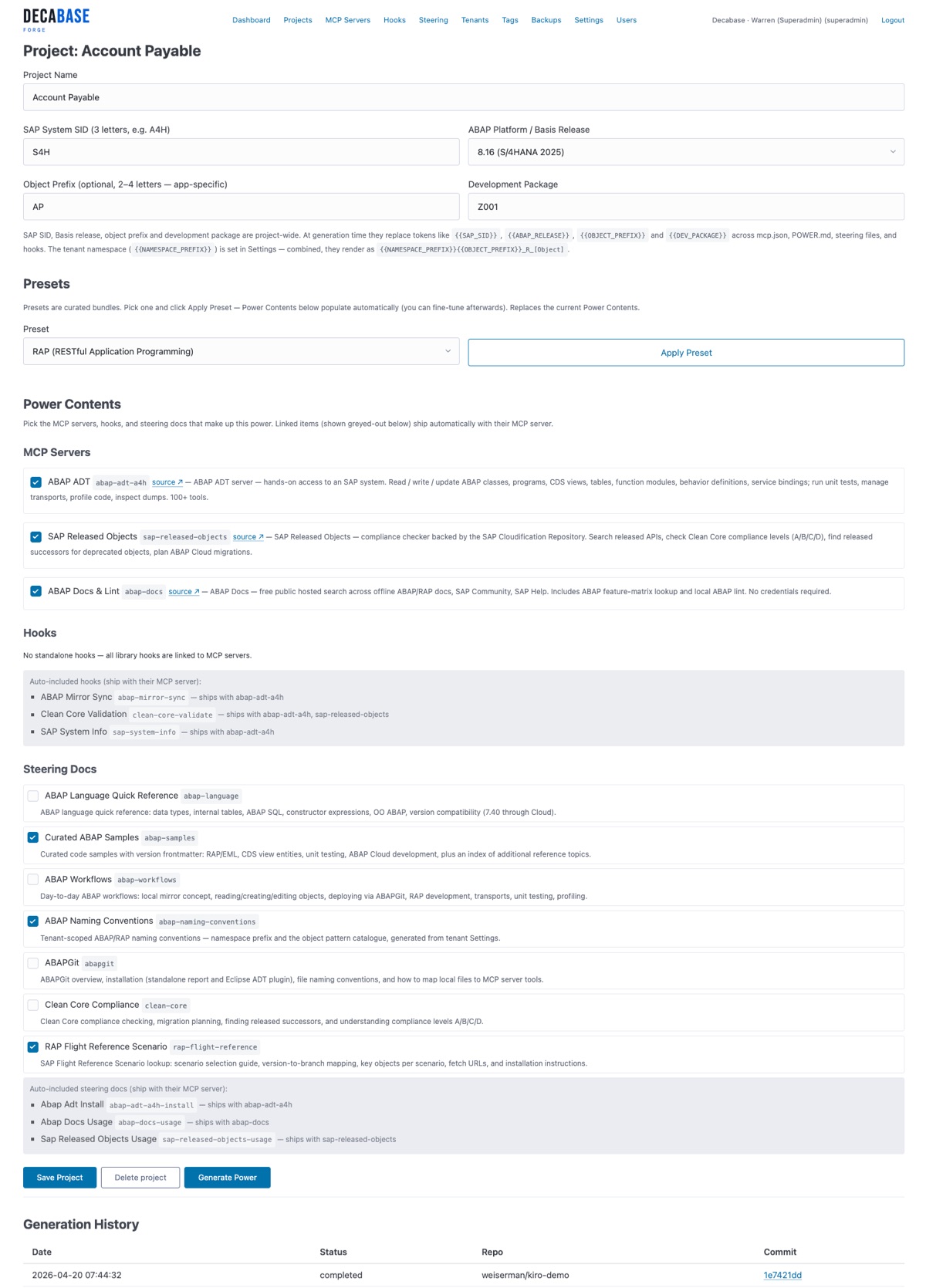
Rather than handing developers a generic ABAP assistant, the Forge pre-bakes your system’s connection details, naming conventions, project-specific code samples, custom hooks for your quality gates, and an auto-approve policy tuned to your security requirements. Every token spent on repetitive context is a token not spent on useful output — at scale across a development team, that adds up fast.
Supported SAP Systems
| System Type | Auth Method | Supported |
|---|---|---|
| SAP BTP ABAP Environment | OAuth2 (service key) | ✅ |
| S/4HANA Cloud Private Edition | OAuth2 (service key) | ✅ |
| S/4HANA On-Premise | Basic auth (.env file) | ✅ |
| SAP ECC / NetWeaver 7.50+ | Basic auth (.env file) | ✅ |
Both Windows and macOS with platform-specific installation guides in the onboarding steering file.
Development and test systems only. Production deployments go through the SAP transport system or CI/CD pipelines — never through direct MCP writes.
Credits
Built on open-source MCP servers from the SAP developer community:
- fr0ster/mcp-abap-adt — ABAP ADT MCP Server by fr0ster
- ClementRingot/sap-released-objects-server — SAP Cloudification Repository Server by Clement Ringot
- marianfoo/abap-mcp-server — ABAP Docs MCP Server by Marian Zeis
- SAP-samples/abap-platform-refscen-flight — SAP Flight Reference Scenario
Built with the Kiro Power Builder by Warren Eiserman, decabase.com.
Want this configured for your team? Get in touch or log in to the Forge if you’re an existing client.